TI
Systemd Getty Autologin 설정 가이드
rorosi
2025. 10. 2. 11:28
728x90
테스트 환경
- SK-AM62A-LP
- 11_01_07_05 Processor SDK
본 글은 AM62A EVM에서 시리얼 포트(ttySx) 접속 시 비밀번호 입력 없이 root 계정 자동 로그인이 필요할 경우, serial-getty@.service를 override 해서 설정할 수 있습니다.
1. 현재 활성화된 getty 서비스 확인
root@am62axx-evm:/opt/edgeai-gst-apps# systemctl list-units | grep getty
  getty@tty1.service                                                                                      loaded active running   Getty on tty1
  serial-getty@ttyS6.service                                                                              loaded active running   Serial Getty on ttyS6
  system-getty.slice                                                                                      loaded active active    Slice /system/getty
  system-serial\x2dgetty.slice                                                                            loaded active active    Slice /system/serial-getty
  getty.target                                                                                            loaded active active    Login Prompts
위 예에서는 ttyS6가 사용되고 있음
2. 원본 서비스 확인
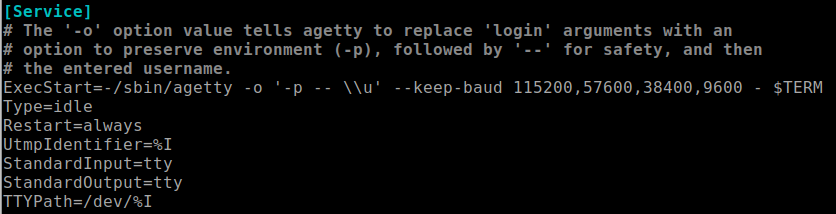
systemctl cat serial-getty@ttyS6.service원본 내용은 보통 /usr/lib/systemd/system/serial-getty@.service에 있으며, 핵심 실행 라인은 다음과 같다.
3. 오버라이드 설정 추가
다음 명령으로 override 편집을 시작
systemctl edit serial-getty@ttyS6.service빈 파일이 열리면 아래 내용을 작성

설명
- ExecStart= : 기존 값을 비우는 역할
- --autologin root : root 사용자 자동 로그인
저장 후 종료하면 /etc/systemd/system/serial-getty@ttyS6.service.d/override.conf 파일이 생성됩니다.
4. 변경사항 반영
변경 사항 적용
systemctl daemon-reload
systemctl restart serial-getty@ttyS6.service
상태 확인
systemctl status serial-getty@ttyS6.service
5. 테스트
PC에서 시리얼 콘솔로 ttyS6에 접속하면, 로그인 프롬프트 없이 곧바로 root 셸에 들어갑니다.

728x90